
A digital wardrobe for the clothes you already own.
Photograph a piece, or lay out a few and use one photo. Fashion Frame cuts each item out, suggests its type, color, material and season, and keeps your whole closet in your pocket.

Or start on the web with the same account.
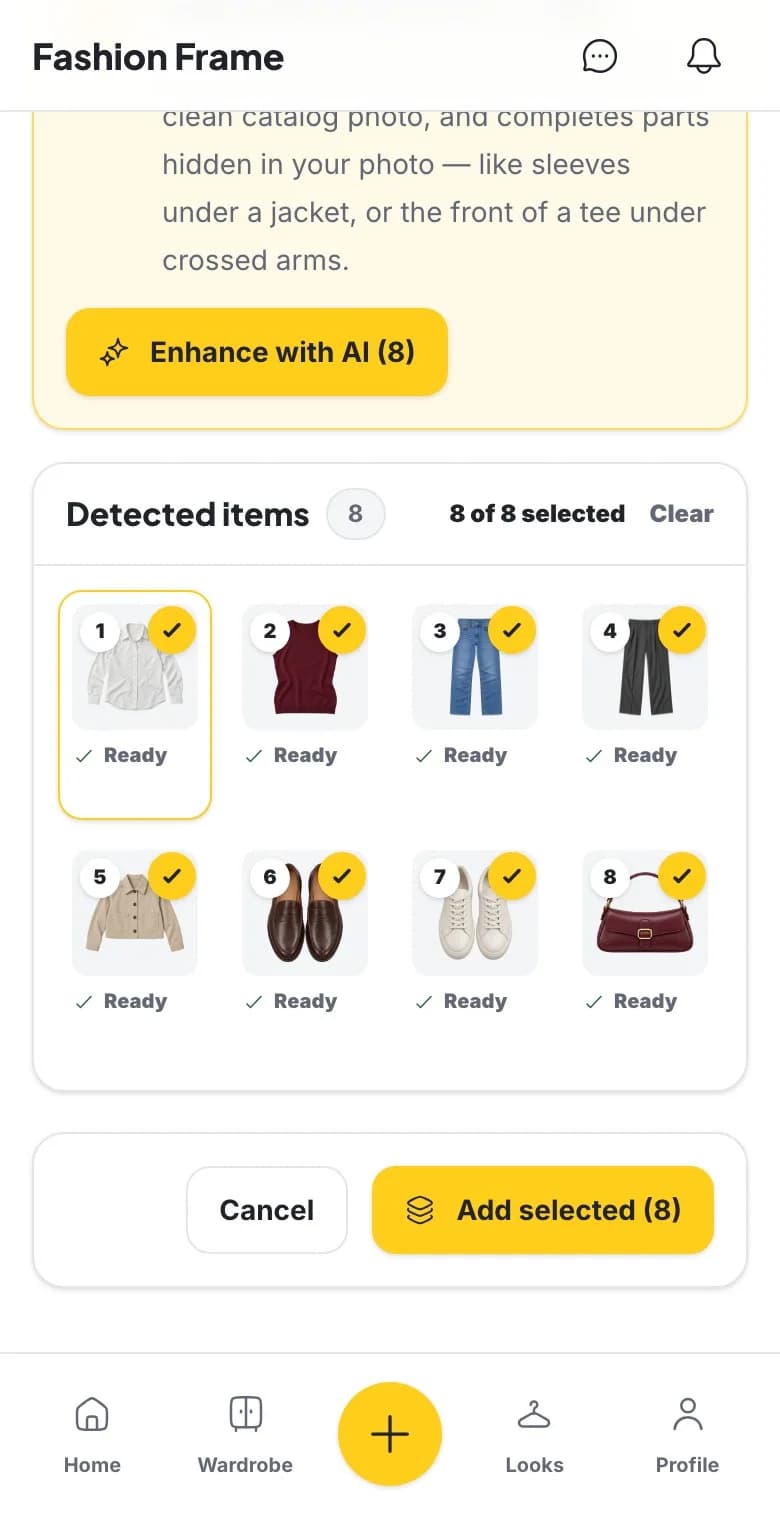
Add clothes without the busywork
Start with the pieces you wear most. Upload one item, or photograph a few laid out together: Fashion Frame finds each garment, cuts it out onto a clean background and suggests the details. You check them before anything joins your wardrobe, and you can edit categories, colors and tags at any time.
Find what you own
Filter the closet by category, favorites, what is in the laundry, or what you have never worn. Each piece keeps its own record, including when you last wore it and, once it has a price and a wear, its cost per wear.
See what you actually wear
Mark items as worn and Insights shows how much of your wardrobe is in rotation and how many pieces have never left the closet, so you can shop your own wardrobe before buying more.
Turn the closet into outfits
Build looks from your pieces, or press Dress me for suggestions from your own wardrobe. When a day needs more thought, ask the AI stylist in Chat, then plan the look on your calendar.
How to start
Step 1
Photograph a few pieces
Your most-worn clothes first. One photo can hold several items.
Step 2
Check the details
Review the suggested type, color, material and season, then add the pieces.
Step 3
Build looks
Combine pieces yourself or with Dress me, and save the looks you like.
Questions
What is a digital wardrobe app?
An app that keeps a photo record of the clothes you own, so you can see everything at once, build outfits from it and track what you wear. Our digital wardrobe guide explains how to start one.
Do I need to photograph my whole closet?
No. Add the pieces you wear most and build from there. A small, accurate wardrobe is more useful than a complete one you never update.
Can I add several items from one photo?
Yes. Lay a few pieces out, or use a photo of an outfit, and Fashion Frame detects each garment and lists it as its own cut-out for you to review.
Is it free?
You can start on the free plan. Adding items from a photo uses AI credits, and the free plan includes a monthly allowance. See Pricing for the current amounts.
Is my wardrobe private?
Your wardrobe belongs to your account. You control closet visibility in Privacy settings; see our privacy policy for how photos and account deletion are handled.
Does it work on my phone?
Yes. Fashion Frame runs on the web, iPhone and Android with the same account.